

TheDocumentation Index
Fetch the complete documentation index at: https://cometchat-22654f5b-release-unreal-docs.mintlify.app/llms.txt
Use this file to discover all available pages before exploring further.
UCometChatSubsystem exposes 40+ multicast delegates organized by listener type. All delegates fire on the Game Thread, so you can safely update UI directly.
Event Flow
Binding Delegates
- Blueprint
- C++
- Get a reference to the CometChat Subsystem
- Drag off the Subsystem pin and search for the delegate name (e.g., On Text Message Received)
- Select Bind Event to wire it to a custom event node
- The custom event automatically gets the correct parameter type
MessageListener Events
These fire when messages, typing indicators, receipts, or reactions arrive.| Delegate | Payload | Fires When |
|---|---|---|
OnTextMessageReceived | FCometChatMessage | A text message arrives |
OnMediaMessageReceived | FCometChatMessage | A media (image/video/audio/file) message arrives |
OnCustomMessageReceived | FCometChatMessage | A custom message arrives |
OnInteractiveMessageReceived | FCometChatMessage | An interactive message arrives |
OnInteractionGoalCompleted | FCometChatInteractionReceipt | An interaction goal is completed |
OnTypingStarted | FCometChatTypingIndicator | A user starts typing |
OnTypingEnded | FCometChatTypingIndicator | A user stops typing |
OnMessagesDelivered | FCometChatMessageReceipt | Messages delivered to recipient |
OnMessagesRead | FCometChatMessageReceipt | Messages read by recipient |
OnMessagesDeliveredToAll | FCometChatMessageReceipt | Messages delivered to all group members |
OnMessagesReadByAll | FCometChatMessageReceipt | Messages read by all group members |
OnMessageEdited | FCometChatMessage | A message is edited |
OnMessageDeleted | FCometChatMessage | A message is deleted |
OnTransientMessageReceived | FCometChatTransientMessage | A transient (ephemeral) message arrives |
OnMessageReactionAdded | FCometChatReactionEvent | A reaction is added to a message |
OnMessageReactionRemoved | FCometChatReactionEvent | A reaction is removed from a message |
OnMessageModerated | FCometChatMessage | A message moderation status changes |
OnAIAssistantMessageReceived | FCometChatMessage | An AI assistant message arrives |
OnAIToolResultReceived | FCometChatMessage | An AI tool result arrives |
OnAIToolArgumentsReceived | FCometChatMessage | AI tool arguments arrive |
- Blueprint
- C++
Bind to On Text Message Received. The custom event receives an
FCometChatMessage. Use ReceiverType to check if it’s a user (1:1) or group message.UserListener Events
These fire when a user’s online status changes.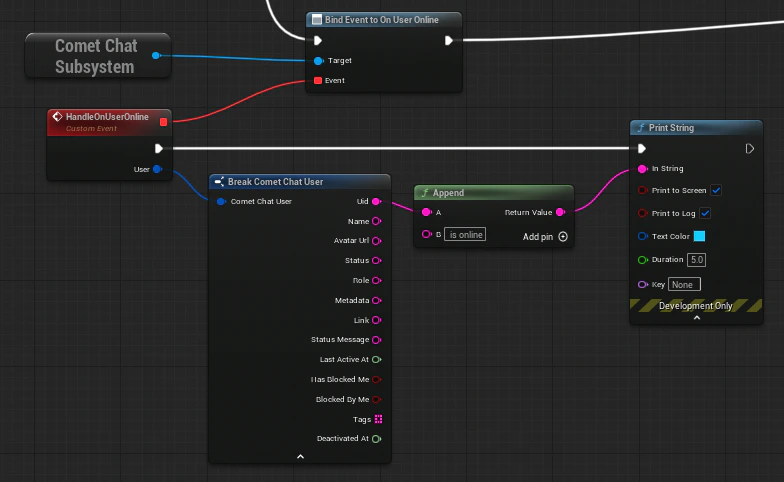
| Delegate | Payload | Fires When |
|---|---|---|
OnUserOnline | FCometChatUser | A user comes online |
OnUserOffline | FCometChatUser | A user goes offline |
- Blueprint
- C++
Bind to On User Online / On User Offline. The custom event receives an
FCometChatUser with the user’s full profile.GroupListener Events
These fire when group membership changes occur.| Delegate | Payload | Fires When |
|---|---|---|
OnGroupMemberJoined | FCometChatAction, FCometChatUser, FCometChatGroup | A user joins a group |
OnGroupMemberLeft | FCometChatAction, FCometChatUser, FCometChatGroup | A user leaves a group |
OnGroupMemberKicked | FCometChatAction, FCometChatUser, FCometChatUser, FCometChatGroup | A member is kicked (includes who kicked) |
OnGroupMemberBanned | FCometChatAction, FCometChatUser, FCometChatUser, FCometChatGroup | A member is banned (includes who banned) |
OnGroupMemberUnbanned | FCometChatAction, FCometChatUser, FCometChatUser, FCometChatGroup | A member is unbanned |
OnGroupMemberScopeChanged | FCometChatScopeChangeEvent | A member’s role/scope changes |
OnMemberAddedToGroup | FCometChatAction, FCometChatUser, FCometChatUser, FCometChatGroup | A member is added by another user |
- Blueprint
- C++
Bind to On Group Member Joined. The custom event receives the action, the user who joined, and the group.
ConnectionListener Events
These fire when the WebSocket connection state changes.| Delegate | Payload | Fires When |
|---|---|---|
OnConnected | — | WebSocket connection established |
OnConnecting | — | SDK is attempting to connect |
OnDisconnected | — | WebSocket connection lost |
OnFeatureThrottled | — | A feature is being rate-limited |
OnConnectionError | FCometChatError | A connection error occurred |
- Blueprint
- C++
Bind to On Connected, On Disconnected, etc. These are parameterless events (except
OnConnectionError which provides an FCometChatError).LoginListener Events
These fire on login/logout lifecycle events.| Delegate | Payload | Fires When |
|---|---|---|
OnLoginSuccess | FCometChatUser | Login succeeds |
OnLoginFailure | FCometChatError | Login fails |
OnLogoutSuccess | — | Logout succeeds |
OnLogoutFailure | FCometChatError | Logout fails |
- Blueprint
- C++
Bind to On Login Success to receive the logged-in
FCometChatUser after authentication completes.AIAssistantListener Events
These fire when AI assistant interactions occur.| Delegate | Payload | Fires When |
|---|---|---|
OnAIAssistantEvent | FCometChatAIAssistantEvent | An AI assistant event occurs |
- Blueprint
- C++
Bind to On AI Assistant Event. The custom event receives an
FCometChatAIAssistantEvent with event type, data, conversation ID, and sender UID.Error Handling — FCometChatError
Many delegates and failure callbacks provide anFCometChatError struct with details about what went wrong. Always handle errors gracefully in your game.
FCometChatError
| Property | Type | Description |
|---|---|---|
Code | FString | Machine-readable error code (e.g., "ERR_AUTH_FAILED", "ERR_NETWORK") |
Message | FString | Human-readable error description |
Details | FString | Additional context (may be empty) |
Handling Errors
- Blueprint
- C++
All async nodes have an On Failure pin. Wire it to a custom event that receives an
FString error message. Connection and login listener events provide the full FCometChatError struct.Manual Connection
By default, the SDK auto-connects the WebSocket after login. For games with loading screens or lobbies where real-time events aren’t needed immediately, you can manage the connection manually.Setup Manual Mode
SetbAutoEstablishSocketConnection = false in FCometChatAppSettings when configuring:
Connect / Disconnect / Ping
- Blueprint
- C++
- Connect Async — Establish the WebSocket after login
- Disconnect Async — Close the WebSocket (user stays authenticated)
- Ping Async — Verify the connection is alive
Query Connection State
For full details on manual connection management, see Advanced Configuration.
Next Steps
Typing Indicators
Send and receive typing state.
UI Components
Drop-in chat panel and button widgets.