

Beyond the basicDocumentation Index
Fetch the complete documentation index at: https://cometchat-22654f5b-release-unreal-docs.mintlify.app/llms.txt
Use this file to discover all available pages before exploring further.
Configure call, the CometChat Unreal SDK offers advanced configuration for custom hosts, manual connection management, and runtime state queries.
ConfigureWithSettings
UseConfigureWithSettings instead of Configure when you need control over connection behavior, custom hosts, or presence subscription settings.
- Blueprint
- C++
- Create an
FCometChatAppSettingsstruct - Set the desired properties (region, custom hosts, auto-connect behavior)
- Call Configure With Settings on the CometChat Subsystem with your App ID and the settings struct
FCometChatAppSettings
| Property | Type | Default | Description |
|---|---|---|---|
Region | FString | — | App region (us or eu) |
SubscriptionType | FString | — | Presence subscription type (allUsers, roles, friends) |
Roles | TArray<FString> | — | Roles to subscribe to (when SubscriptionType is roles) |
AdminHost | FString | — | Custom admin API host URL |
ClientHost | FString | — | Custom client/WebSocket host URL |
bAutoEstablishSocketConnection | bool | true | Automatically connect WebSocket on login |
When
bAutoEstablishSocketConnection is true (default), the SDK connects the WebSocket immediately after a successful login. Set to false if you want to control when the connection is established — useful for splash screens or loading flows.Manual Connection Management
WhenbAutoEstablishSocketConnection is false, use the async connection nodes to control the WebSocket lifecycle.
Connect
Manually establish the WebSocket connection after login.- Blueprint
- C++
Call the Connect Async node after login succeeds. Handle On Success to know the connection is ready.
Disconnect
Manually close the WebSocket connection without logging out.- Blueprint
- C++
Call the Disconnect Async node. The user remains authenticated but won’t receive real-time events.
Ping
Verify the connection is alive by sending a ping to the server.- Blueprint
- C++
Call the Ping Async node. On Success means the server responded — connection is healthy.
Connection Status
Query the current WebSocket connection state at any time.- Blueprint
- C++
Call Get Connection Status on the CometChat Subsystem. Returns an
ECometChatConnectionState enum.ECometChatConnectionState
| Value | Description |
|---|---|
Connected | WebSocket is active and receiving events |
Connecting | SDK is attempting to establish the connection |
Disconnected | WebSocket is closed |
FeatureThrottled | A feature is being rate-limited by the server |
Authentication State
IsLoggedIn
Check whether a user is currently authenticated.- Blueprint
- C++
Call Is Logged In on the CometChat Subsystem. Returns a
bool.GetLoggedInUser
Retrieve the currently authenticated user’s profile.- Blueprint
- C++
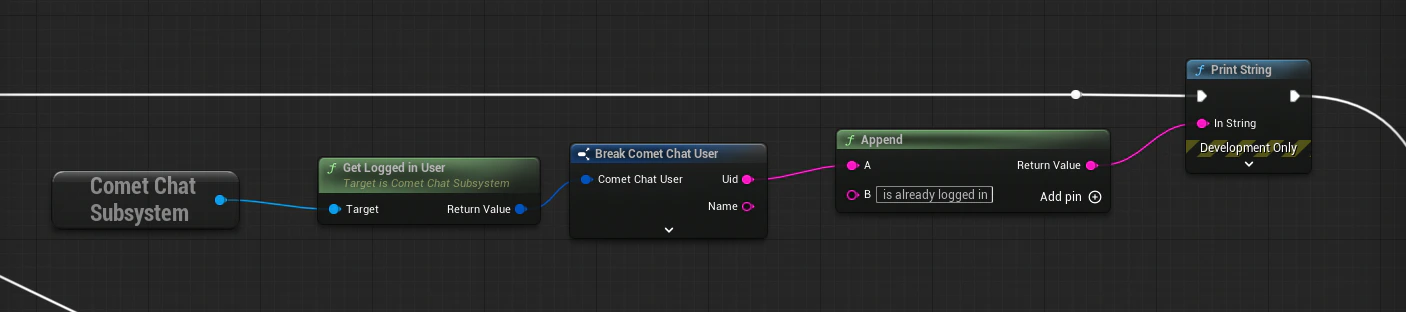
FCometChatUser.Connection Flow (Manual Mode)
Next Steps
Authentication
Log users in with Auth Key or Auth Token.
Real-Time Events
Listen for connection state changes and other events.